
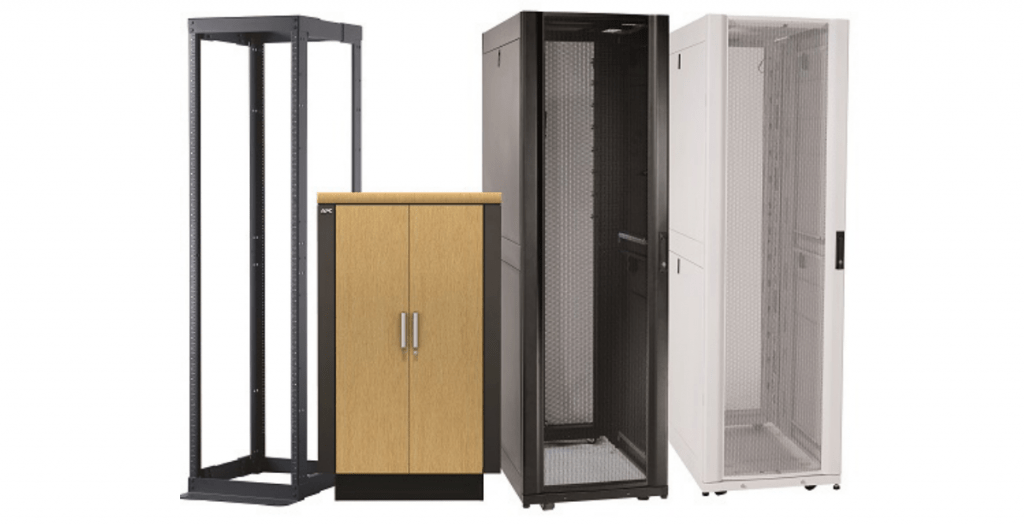
For years, Buying Server Racks and Server cabinets has been shrouded by myth and mystery by manufacturers in order to keep their prices high. Thanks to Comms Express, this is now a thing of the past. We have worked with all our server cabinet suppliers to ensure we can supply you with simple, easy-to-use advice, along with a next-day delivery service (where available), so you can have the equipment when you need it.
Buy Data Cabinets.
For years, purchasing server racks and cabinets was shrouded in myth and mystery by manufacturers to justify high price points. At Comms Express, we’ve disrupted that model. By working directly with our suppliers, we provide transparent, easy-to-use advice and next-day delivery (where available) to ensure your infrastructure is ready when you are.
Use this guide to navigate the technical specifications and find the perfect housing for your IT equipment.
Why Choose a Professional Server Cabinet?
A professional rack is the backbone of your hardware’s health. Beyond simple organisation, a dedicated cabinet provides:
- Validated Cooling: Optimised for front-to-back airflow patterns.
- Structural Integrity: Engineered to support heavy enterprise-grade hardware.
- Rapid Deployment: Our partnership with top suppliers means your rack arrives ready for installation.
Recommendations: Finding the “Best For” Your Setup
| Need | Recommended Category | Key Benefit |
| Enterprise Data Center | 42U Server Racks | Maximum density and cable management. |
| Small Office/SOHO | Wall-Mounted Cabinets | Saves floor space for switches/patching. |
| Quiet Office Spaces | Acoustic Soundproof Racks | Reduces server fan noise by up to 20dB. |
| Lab/Testing Environment | Open Frame Racks | Easy 360-degree access for frequent swaps. |
How to Choose the Correct Height (The ‘U’ Guide)
The most critical measurement in any rack is the ‘U’ size. A Rack Unit (1U) is the universal standard for all rackmount equipment, measuring exactly 44.45mm in height.
1. Calculate Your Internal Requirements
- Standard Gear: A typical 24-port patch panel or network switch is 1U.
- Non-Rackmount Gear: If placing a tower server or desktop on a shelf, measure the height in mm and divide by 44.45. Note: Each shelf typically consumes an additional 1U of space.
- Future-Proofing: Always include at least 10% additional room for expansion. Migrating a fully-loaded cabinet later is a costly, time-consuming headache.
2. External Clearance vs. Internal Space
It is a common mistake to assume the internal “U” height is the total size of the rack.
Important: A 42U rack provides 1867mm of internal space, but you must account for cable entry, fan trays, and castors/feet. This adds 250mm–300mm to the external height. Ensure your room has at least 2120mm of clearance for a 42U cabinet.
Comparison: Data Cabinets vs. Server Cabinets
| Feature | Data Cabinet | Server Cabinet |
| Primary Goal | Cable density/Patching | Hardware cooling/Depth |
| Door Style | Usually Glass (Visual) | Mesh (High Airflow) |
| Depth | 600mm to 800mm | 1000mm to 1200mm |
| Weight Load | Lighter (Switches/Panels) | Heavy Duty (Servers/UPS) |
Expert Verdict
If you are housing modern servers, prioritize Depth and Airflow. We recommend a minimum of a 1000mm deep cabinet with mesh doors to ensure your hardware doesn’t throttle due to heat. For networking-only setups, an 800mm wide data cabinet offers the best cable management experience.
10 Most Popular Questions About Server Cabinets
1. What is the difference between a Server Cabinet and a Data Cabinet?
The Difference: Server cabinets are deeper (1000mm+) and feature mesh doors for maximum airflow to cool active processors. Data cabinets are typically shallower (600mm–800mm) with glass doors, designed for networking switches and patch panels where noise reduction and aesthetics are prioritised over high-volume cooling.
2. How do I calculate the ‘U’ height I need?
The Rule: Total the height of your equipment in Rack Units (1U = 44.45mm). If using non-rackmount gear on a shelf, divide its height in mm by 44.45 and add 1U for the shelf itself. Always add 10–20% “growth space” to avoid a full rack migration in the future.
3. Will a 42U rack fit through a standard doorway?
The Check: Most 42U racks have an external height of approximately 2000mm to 2100mm. Standard UK office doors are often 1981mm. Always check the external dimensions (including castors) on the Comms Express product page before ordering.
4. Should I choose a 600mm or 800mm wide cabinet?
- 600mm Wide: Best for space-saving and standard server mounting.
- 800mm Wide: Essential for high-density patching. The extra 200mm provides vertical “alleys” for cable management, preventing cables from blocking airflow to the equipment.
5. How deep does my server rack need to be?
Modern servers (Dell PowerEdge, HP ProLiant) typically require a 1000mm deep rack. While the server chassis might be 800mm, you need the extra 200mm for:
- Cable Management Arm (CMA) clearance.
- PDU (Power Distribution Unit) mounting.
- Airflow at the rear.
6. What is the weight capacity of a standard floor-standing rack?
Standard racks usually support between 800kg and 1300kg of static load. If you are installing heavy UPS systems or dense storage arrays, ensure you select a Heavy Duty Rack specifically rated for high-load capacities.
7. Do I need a mesh or a glass door?
- Mesh: Mandatory for servers. It allows for the front-to-back airflow required to prevent hardware thermal throttling.
- Glass: Ideal for networking hardware in quiet office environments, as it helps contain fan noise while allowing for visual status checks.
8. How do I manage heat inside a closed cabinet?
Effective thermal management requires:
- Fan Trays: To pull hot air out of the top.
- Blanking Panels: To fill empty “U” spaces, preventing hot air from recirculating to the front.
- Brush Strips: For cable entry points to maintain internal air pressure.
9. Can I wall-mount a server?
Only small ones. Wall-mount cabinets are designed for networking gear. Most full-sized servers are too deep and heavy for wall mounting. For small offices, look at Deep Wall Boxes (600mm) for “short-depth” servers only.
10. What accessories are “must-haves” for a new rack?
Every new rack deployment should include:
- Buy Cage Nuts & Bolts: Essential for mounting any gear.
- Buy PDUs: For distributing power within the rack.
- Buy Shelves: For non-rackmount items.
- Cable Management Rings: To keep the front of the rack organised and traceable.
This document is given as a guide only; there may be many other factors you need to consider when purchasing a server rack. If you have any questions, please contact our sales team. Disclaimer – We have provided this article as general advice to our customers. We make no claims about the completeness or the accuracy of the information as it may apply to an infinite number of field conditions. It is the responsibility of the person or persons using this information to check with all concerned parties, owners and local authorities, etc., before doing an installation. Users of this information agree to hold Comms Express Ltd. harmless from liabilities of any kind relating to the use of this information.
Shop the Full Range at Comms Express
Browse the UK’s most trusted brands and high-performance infrastructure solutions.
- Cabling & Racks
- Buy Network Cables
- Shop RJ45 Patch Leads
- Buy Patch Panels
- Shop Cat6 Cable
- Buy Fibre Patch Leads
- Shop Server Racks
- Buy Data Cabinets
- Networking & Power
- Shop Network Switches
- Buy UPS Systems
- Shop Rack PDUs
- Buy IP CCTV & Cameras
- Offers & Savings
- Shop Discounts
- Buy Multi-Buy Offers
- Our Top Brands
- Shop Ubiquiti | Buy TP-Link
- Shop Cisco | Buy Netgear
- Shop DrayTek | Buy D-Link
- Shop HPE Aruba | Buy APC
- Shop Teltonika | Buy Eaton
- Shop Excel | Buy Lindy
- Own Brands
- Shop Datacel | Buy CE Networking
Project Planning? Get expert technical advice and custom quotes for large installations. Contact our expert sales team today.
